Cámara is a robotic creature built on a commercial PTZ camera and a Raspberry Pi 5. When someone says “oye cámara” (“hey camera”) —its wake word—, it understands it, knows which side the voice came from and turns there.
Its ear is the microphone of a PS3 Eye, a row of microphones 20 mm apart. The voice reaches the nearest microphone slightly earlier, and from that difference Cámara knows which side it is being spoken to from. Then Vosk —a speech recognizer running on the Pi, offline— understands “oye cámara” and waits 4 seconds for a command, within a closed vocabulary of 62 words: “sígueme” (follow me), “foto” (photo), “baila” (dance)…
Listen
A single program opens the microphone and hands out audio and direction.
Locate
Which side the voice came from: left, front or right.
Understand
Recognize “oye cámara” offline.
Listen: one microphone, one owner
The PS3 Eye delivers 4 channels at 16 kHz. A single program opens them, ODAS, which works out where the sound comes from and hands out two things: the direction and the audio already focused on it. Nobody else touches the microphone.
That “focused” audio comes from a technique called beamforming. Since the voice reaches each microphone with a small offset, ODAS delays each channel just enough for the voice coming from the chosen direction to line up, and then adds them. The voice adds to itself and gets stronger; noise from other directions stays misaligned and fades. It is like turning an ear toward whoever is speaking, without moving anything.
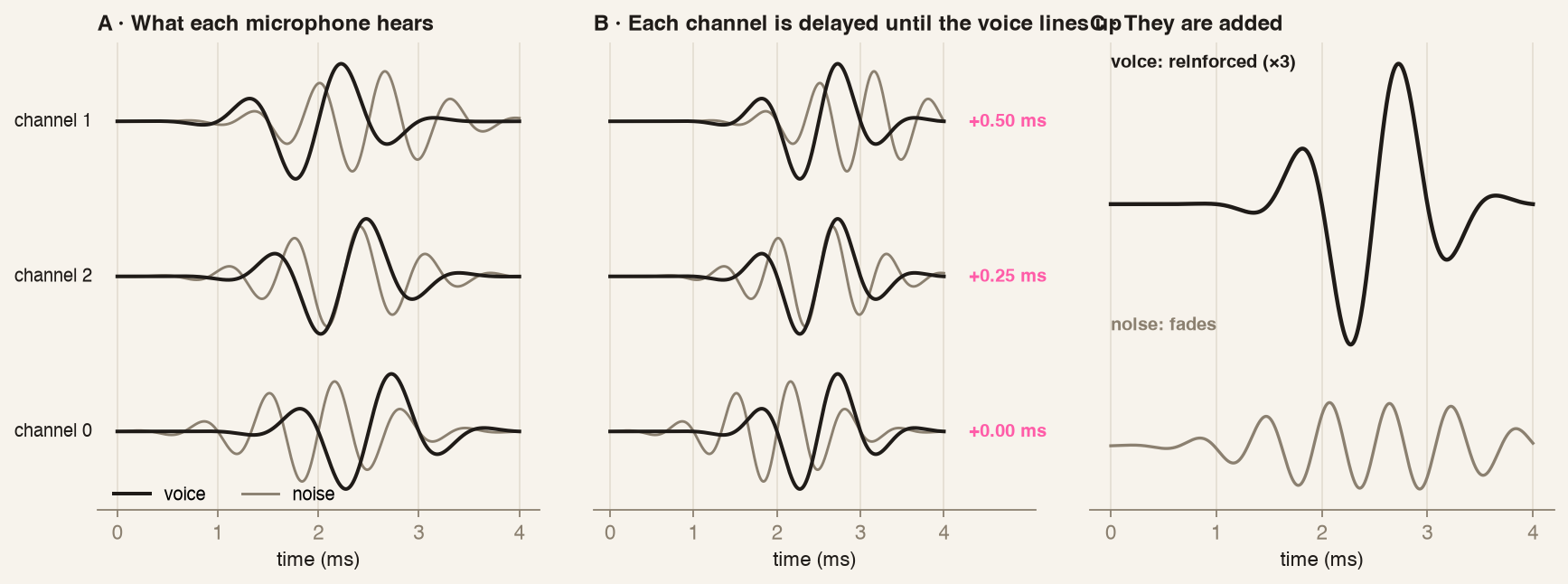
One physical resource, one owner
If two programs open the same device, failures come and go and cannot be reproduced.
Locate: the side, not the angle
The voice reaches one microphone slightly before another, and that shift is the direction. With three microphones in a row, the row spans 40 mm: enough to tell left from right, not to give a fine angle. With the voice in front it reads 0 in 20 out of 20 samples; to the sides the reading scatters ±15°.
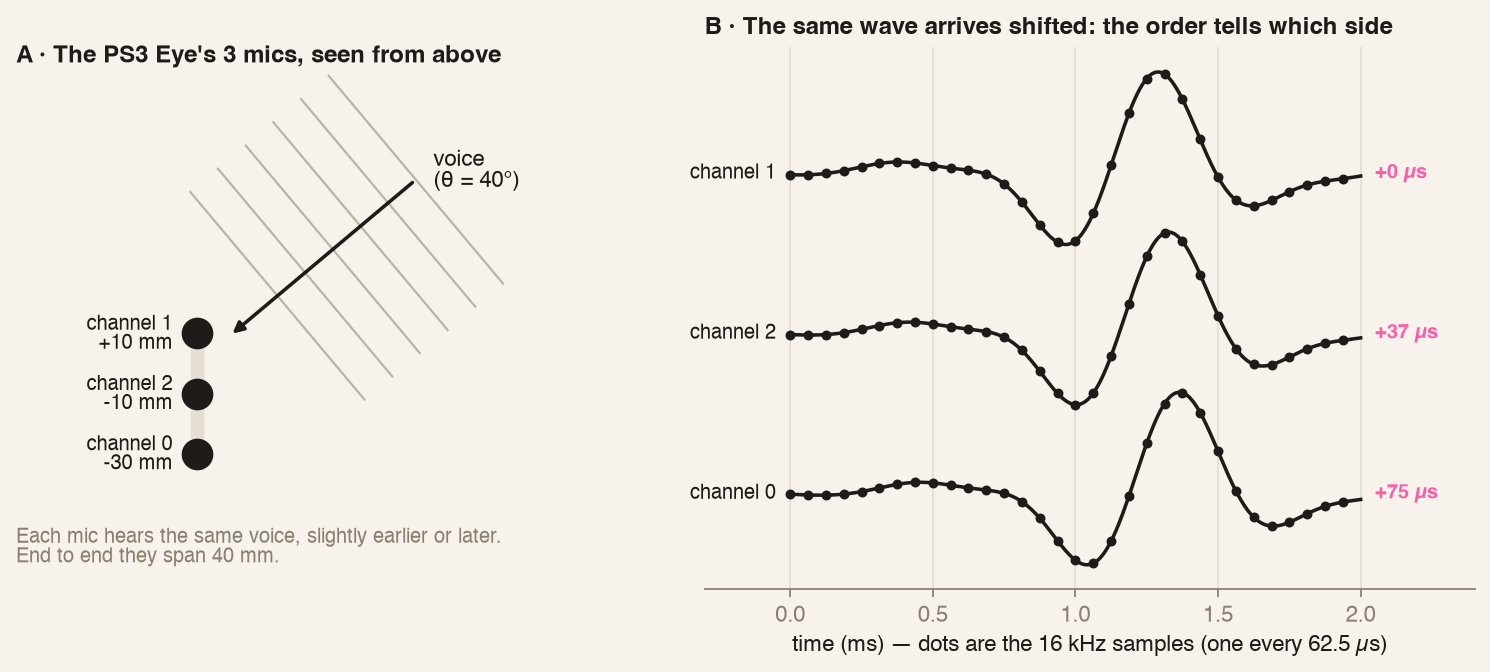
Direction is read backwards: by the time Cámara recognizes “oye cámara”, the phrase is over. It looks at the 2.0 to 0.2 s before and compares them with the 3.5 s before that. The winner is the side that grew, not the loudest: that way the noise already in the room does not win.
| criterion | correct | turns to the wrong side |
|---|---|---|
| by 15° sector, threshold 0.10 | 7/13 | 0 |
| by side, threshold 0.10 | 9/13 | 0 |
| by side, threshold 0.06 to 0.08 | 10/13 | 1 |
Asking for less wins one call, but adds a turn to the wrong side. When it is not sure, Cámara does not turn: it searches.
Ask the sensor for what its geometry gives
A short aperture separates sides; demanding angles from it only adds noise to the decision.
Getting the side wrong is worse than not knowing
The threshold is chosen by counting the errors that cost most, not the hits.
Understand: few words, offline
The recognizer is Vosk, which runs on the Pi and only knows a closed list: the wake word and 62 command words. It does not hear raw audio: it hears what ODAS builds by pointing where it thinks the voice is. Each word has to pass a confidence of 0.60, and after “oye cámara” the command has to arrive within 4 s.
Leaving Vosk only “oye cámara” saves 25 % CPU, but breaks saying “oye cámara sígueme” in one go. So Vosk keeps hearing every word, and what gets filtered is what to do with them.
What is heard at home stays at home
A robot that listens all day in a home should not send that audio to a server. Recognizing speech on the robot itself, offline, makes privacy a property of the design rather than a promise.
A closed vocabulary, for now
With few words, a small recognizer gets far more right and does not invent orders nobody gave. It is just enough to obey commands; conversation will require opening it up.
Problems we ran into
A dead channel lost half of the hotwords
Cámara would stop recognizing “oye cámara” now and then, without a single error. The cause: one of the four microphones was dead. Three channels read −49 to −47 dBFS and resembled each other (correlation 0.79–0.87); the fourth read −79 dBFS and resembled none of them (~0.00): background noise, not a microphone.
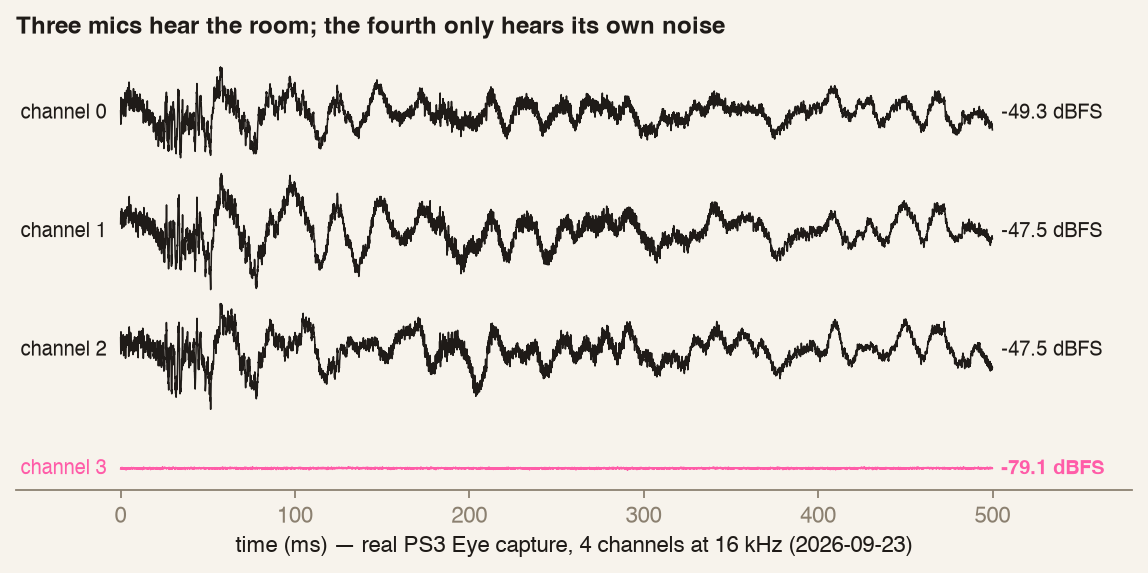
A dead channel does not make ODAS fail: it makes it compute another direction, and the audio it passes to Vosk points at the wrong place. We tested it with 8 “oye cámara” recorded once and run through all three paths:
| path | hotwords out of 8 |
|---|---|
| raw audio, one channel | 8/8 |
| ODAS with all 4 mics | 4/8 |
| ODAS with 3 mics | 8/8 |
The fix was one line of configuration: dropping the dead channel. The cost: with 3 mics direction gives the side, not the angle.
A dead channel does not fail, it lies
Each channel's health has to be watched: the system keeps running, on false data.
Compare on the same stimulus
Recording once and running the same audio through every variant makes the test repeatable.
The fan, the closest noise
The Pi's fan sits behind the microphones, about 40 mm away. The Pi drives it on its own at five speeds, from 0 (off) to 4 (full), according to its temperature. With the room silent, the direction Cámara reads drifts toward the fan as soon as it reaches speed 2: from there on, its ear points at the fan and not at whoever is talking.
| speed | RPM | direction read |
|---|---|---|
| 0 | 0 | +3° |
| 1 | 3200 | +5° |
| 2 | 5500 | +26° |
| 3 | 7500 | +28° |
| 4 | 9200 | +27° |
At speed 1 it does not interfere. From 2 on, background noise rises from −52 to −40 dBFS, with tones at 1.8–2.06 kHz: right where the voice is.
Why the fan speeds up
To follow a person, Cámara looks for faces in every frame of the camera's video. It is a chain: more video frames per second → more CPU → more heat → faster fan → more noise. Looking for faces (YuNet) takes 31 of the ~34 ms available per frame. While following someone, the Pi reached 64–73 °C, with the fan at speed 3.
What we tried
Filtering the noise. It did not work. Ignoring the fan's direction moves the peak to the edge of what is ignored: a few centimeters away, it does not sound from a point but from an area. Removing its tones did not work either, because it is also a hiss that covers every frequency. Subtracting its footprint recovers the order of the sides, but not the angle.
Giving it air. The hot air from the heatsink stayed inside the enclosure, and the fan kept cooling the Pi with that same hot air. We designed and printed two parts: an extractor —a 30×30 mm hood over the fan with a ~25 mm tube that draws fresh air from the lid window— and an outlet that blows the hot air out through the Sense HAT side, away from the microphones.
| no airflow (closed box) | with extractor and outlet | |
|---|---|---|
| Pi temperature | 81.5–83.7 °C | 64–73 °C |
| fan | speed 4 (~9900 rpm) | speed 3 (~7900 rpm) |
| Pi slows itself down from heat | yes | no |
Some 10–18 °C lower, but it is not a clean comparison: between one measurement and the other the software also changed (fewer threads for face detection, resting pace). What is certain is that the Pi stopped slowing itself down.
Fewer frames per second. With the fan held at speed 1, each lower level cools the Pi by about 4 °C. It works, but following someone with few frames means following them worse.
| fps cap | temperature (last minute) | range |
|---|---|---|
| 8 | 68.8 °C | 65.6–72.7 °C |
| 4 | 65.2 °C | 63.4–67.8 °C |
| 2 | 61.3 °C | 59.5–62.8 °C |
Each level ran 4 minutes and carries heat over from the previous one, so the numbers err on the high side. None of them made the Pi slow itself down.
How we solved it
Airflow helped, but the noise is born in the computation. The solution was for tracking not to work when there is no need, and for hearing to know when not to trust itself:
The hardest noise is the robot's own
It is centimeters away, changes with what the robot is doing and does not filter out like room noise.
Cutting useless compute is filtering at the source
Not processing a frame that did not change lowers heat, fan and noise all at once.
How we measured it
Everything on the Pi and in the real room. Recordings are made once and reprocessed with each variant, so the comparison runs on the same audio.
| test | tool | stimulus | what it measures |
|---|---|---|---|
| Clock and level per channel | luf-002 plant mic | known tone | Hz, dBFS, correlation |
| Hotword A/B | hotword-ab.py | 8 recorded “oye cámara” | hotwords out of 8 |
| Fan vs direction | doa-raw.sh | silence and voice, fan commanded 0–4 | direction, dBFS |
| Hotword side | doa-criterio.py | 13 real labeled calls | hits, wrong-side turns |
| Temperature by fps | termica-fps.sh | person in frame, fan held at 1 | °C |
What carries over to other robots
Computation also makes noise and heat
Processing only when something changes lowers CPU, temperature and fan noise all at once.
Check each channel on its own
In a multi-channel sensor, look at each channel's level and how alike they are: a dead one throws no error, it changes the result.
Record once, compare many times
Running the same audio through every variant makes the difference come from the method, not the take.